

LLM Judge#
As Large Language Models (LLMs) continue to evolve, traditional evaluation benchmarks, which focus primarily on task-specific metrics, are increasingly inadequate for capturing the full scope of a model’s generative potential. In real-world applications, LLM capabilities such as creativity, coherence, and the ability to effectively handle nuanced and open-ended queries are critical and cannot be fully assessed through standardized metrics alone. While human raters are often employed to evaluate these aspects, the process is costly and time-consuming. As a result, the use of LLM-based evaluation systems, or “LLM judges”, has gained traction as a more scalable and efficient alternative.
Oumi OSS provides a versatile LLM Judge framework that enables the automation of pointwise and pairwise model evaluations, dataset curation, and quality assurance for model deployment. You can easily customize the evaluation prompts and criteria, select any underlying judge LLM (open-source or proprietary), and locally host or access it remotely via an API.
Overview#
In LLM-based evaluations, an LLM Judge is utilized to assess the performance of a Language Model according to a predefined set of criteria.
The evaluation process is carried out in two distinct steps:
Step 1 (Inference): In the first step, the language model generates responses to a series of evaluation prompts. These responses demonstrate the model’s ability to interpret the prompt and generate a contextually relevant high-quality response.
Step 2 (Judgments): In the second step, the LLM Judge evaluates the quality of the generated responses. The result is a set of judgments that quantify the model’s performance, according to the specified evaluation criteria.
The diagram below illustrates these two steps:
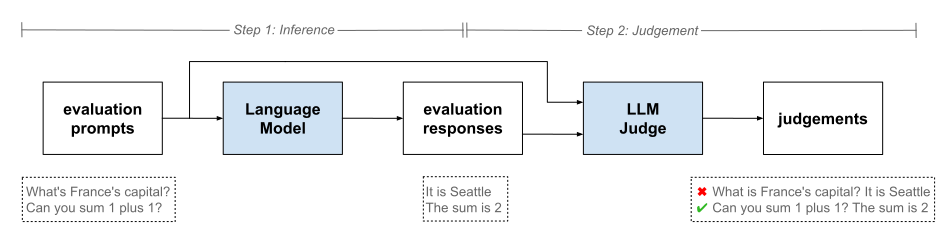
Oumi OSS offers flexible APIs for both Inference and Judgement (“LLM Judge” API).
When to Use?#
Our LLM Judge API is fully customizable and can be applied across a wide range of evaluation scenarios, including:
Model Evaluation: Systematically assessing model outputs and evaluating performance across multiple dimensions.
Custom Evaluation: Tailoring the evaluation process to your specific needs by defining custom criteria, extending beyond standard metrics to address specialized requirements.
Dataset Filtering: Filtering high-quality examples from noisy or inconsistent training datasets, ensuring cleaner data for model training and validation.
Quality Assurance: Automating quality checks in your AI deployment pipeline, ensuring that deployed models meet predefined performance and safety standards.
Compare Models: Comparing different model versions or configurations (e.g., prompts, hyperparameters) across various attributes, enabling more informed decision-making and optimization.
Quick Start#
To leverage an LLM judge, we instantiate a SimpleJudge class using a judge configuration (JudgeConfig). Oumi OSS offers several built-in judges that you can use out-of-the-box for common evaluation tasks (see our GitHub page for the complete list). Alternatively, you can create completely custom judges by defining your own prompts, output formats, and evaluation criteria in a custom config.
Built-In Judges (predefined configuration)#
Select a judge from our GitHub page and use it, as shown below. The following example is for the Truthfulness judge (judges/generic/truthfulness).
from oumi.judges.simple_judge import SimpleJudge

# Instantiate a simple judge using a predefined configuration: Truthfulness
simple_judge = SimpleJudge(judge_config="oumi://configs/projects/judges/generic/truthfulness.yaml")

# Define a dataset
dataset = [
    {
        "request": "What is the capital of France?",
        "response": "Rome",
    }
]

# Evaluate the dataset
outputs = simple_judge.judge(dataset)

# Retrieve the judgement(s) and explanation(s) from the structured output(s)
for output in outputs:
    judgment = output.field_values["judgment"]  # False
    explanation = output.field_values["explanation"]  # The correct answer is Paris.
Custom Judge#
Step 1: Define your custom configuration, such as ./my_judge_config.yaml.
judge_params:
  prompt_template: |
    You are a truthfulness judge. Determine whether the response below is factually accurate.
    If the response is truthful, respond with 'Yes'. Otherwise, respond with 'No'.
    ***
    [request]:
    {request}
    ***
    [response]:
    {response}
    ***

  response_format: JSON
  judgment_type: BOOL
  include_explanation: True

inference_config:
  model:
    model_name: "gpt-4o"

  engine: OPENAI

  generation:
    max_new_tokens: 8192
    temperature: 1.0
Step 2: Load your custom configuration file and evaluate a dataset.
from oumi.judges.simple_judge import SimpleJudge

# Instantiate a simple judge using a local configuration
simple_judge = SimpleJudge(judge_config="./my_judge_config.yaml")

# Define a dataset
dataset = [
    {
        "request": "What is the capital of France?",
        "response": "Rome",
    }
]

# Evaluate the dataset
outputs = simple_judge.judge(dataset)

# Retrieve the judgement(s) and explanation(s) from the structured output(s)
for output in outputs:
    judgment = output.field_values["judgment"]  # False
    explanation = output.field_values["explanation"]  # The correct answer is Paris.
Rule-Based Judges#
Experimental
Rule-based judges are experimental and subject to change.
Some evaluations don’t need an LLM: “does the response contain a phone number?”, “does the output avoid the words error or traceback?”, “is the answer an exact match for the expected string?”. For these cases Oumi provides RuleBasedJudge, which applies a deterministic rule to each input — no inference, no token cost, no LLM variance.
Quick Start#
from oumi.judges.rule_based_judge import RuleBasedJudge

judge = RuleBasedJudge(judge_config="oumi://configs/projects/judges/rule_based/regex_match_phone.yaml")

outputs = judge.judge([
    {"response": "Call me at 555-1234."},
    {"response": "Send an email."},
])

for out in outputs:
    print(out.field_values["judgment"], out.field_scores["judgment"])
# True 1.0
# False 0.0
Config Schema#
Rule-based judges reuse JudgeConfig but drive evaluation from a new rule_judge_params block (RuleJudgeParams) instead of calling an LLM. inference_config is not required.
judge_params:
  prompt_template: "{response}"   # still required; placeholders are validated

rule_judge_params:
  rule_type: "regex"               # rule registered in the RULE registry
  input_fields: ["response"]       # fields expected on each input dict

  rule_config:                      # rule-specific options
    pattern: "\\d{3}-\\d{4}"
    input_field: "response"
    match_mode: "search"            # "search" | "match" | "fullmatch"
    inverse: false                   # pass when pattern does NOT match
    flags: 0                         # optional re.* flag bitmask

  response_format: XML              # XML | JSON | RAW
  judgment_type: BOOL               # BOOL | INT | FLOAT | TEXT | ENUM
Built-in Rules#
Rule |
Description |
Key |
|---|---|---|
|
Python |
|
New rules register themselves via @register("my_rule", RegistryType.RULE) on a class that implements BaseRule and returns (judgment: bool, score: float) from apply().
Ready-Made Configs#
Config |
What it checks |
|---|---|
Response contains an |
|
Response does NOT contain |
CLI Usage#
oumi judge dataset \
    -c oumi://configs/projects/judges/rule_based/regex_match_phone.yaml \
    --input data/dataset_examples/judge_input.jsonl
Rule-based judges are run through the same oumi judge dataset command as LLM judges — the CLI dispatches to RuleBasedJudge automatically when rule_judge_params is present in the config.
Batch Judging#
For providers that support batch inference (OpenAI, Anthropic, Together, Fireworks, Parasail — see inference_engines), BaseJudge can submit, poll, and collect judgments asynchronously at reduced cost.
from oumi.judges.simple_judge import SimpleJudge

judge = SimpleJudge("oumi://configs/projects/judges/generic/truthfulness.yaml")

inputs = [{"request": "...", "response": "..."}, ...]

# Submit as a single batch
batch_id, conversations = judge.judge_batch_submit(inputs)

# ... later, possibly in a different process ...
# Poll the engine directly if you need a status update
status = judge.inference_engine.get_batch_status(batch_id)

# Collect when done
outputs = judge.judge_batch_result(batch_id, conversations)  # raises on any failure

# Or tolerate per-row failures:
result = judge.judge_batch_result_partial(batch_id, conversations)
print(f"Succeeded: {len(result.successful)}, failed: {len(result.failed_indices)}")
judge_batch_submit returns the provider batch ID and the Conversations used to build it — you must pass both back to judge_batch_result(_partial) so that inputs and outputs can be re-aligned. Rule-based judges don’t call inference, so batch judging does not apply to them.
Token Usage Tracking#
Both SimpleJudge and RuleBasedJudge inherit from BaseJudge, which accumulates per-request token usage across every call to judge() / judge_batch_result(). After a run you can read:
print(judge.total_input_tokens)    # sum of prompt_tokens across requests
print(judge.total_output_tokens)   # sum of completion_tokens
print(judge.total_cached_tokens)   # prompt tokens served from provider cache
Usage is recorded whether the request went through infer() (online) or infer_batch() (batch), so the totals are directly comparable across modes. Rule-based judges make no LLM calls and leave these counters at zero.
Next Steps#
Explore our Built-In Judges for out-of-the-box evaluation criteria
Understand the Judge Configuration options
Explore CLI usage for command-line evaluation